 MINARA
Custom Agents
Saved bundles of system prompt + skills + tools + risk ceiling + triggers, runnable from CLI, REPL, HTTP, workflows, and cron
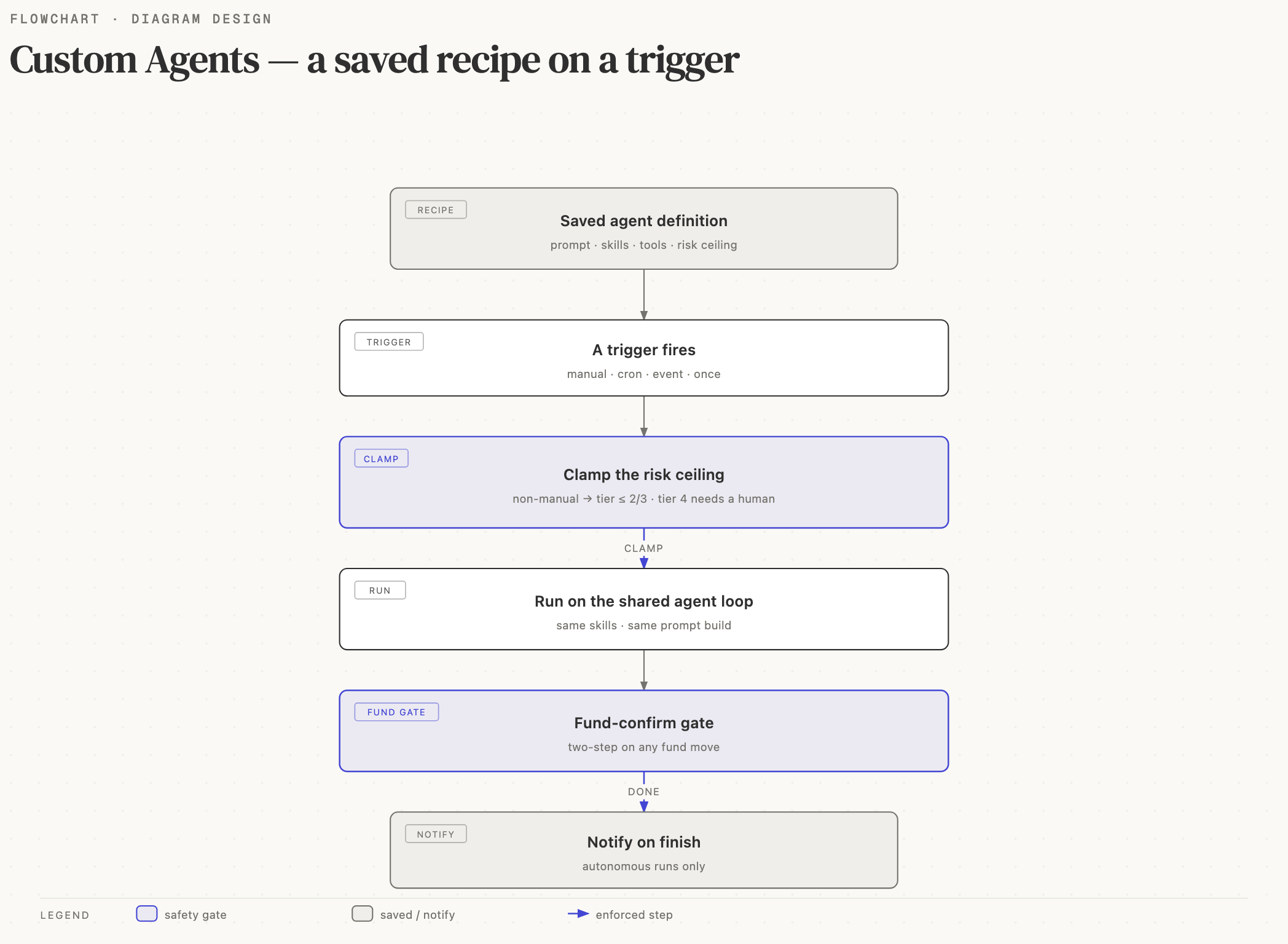
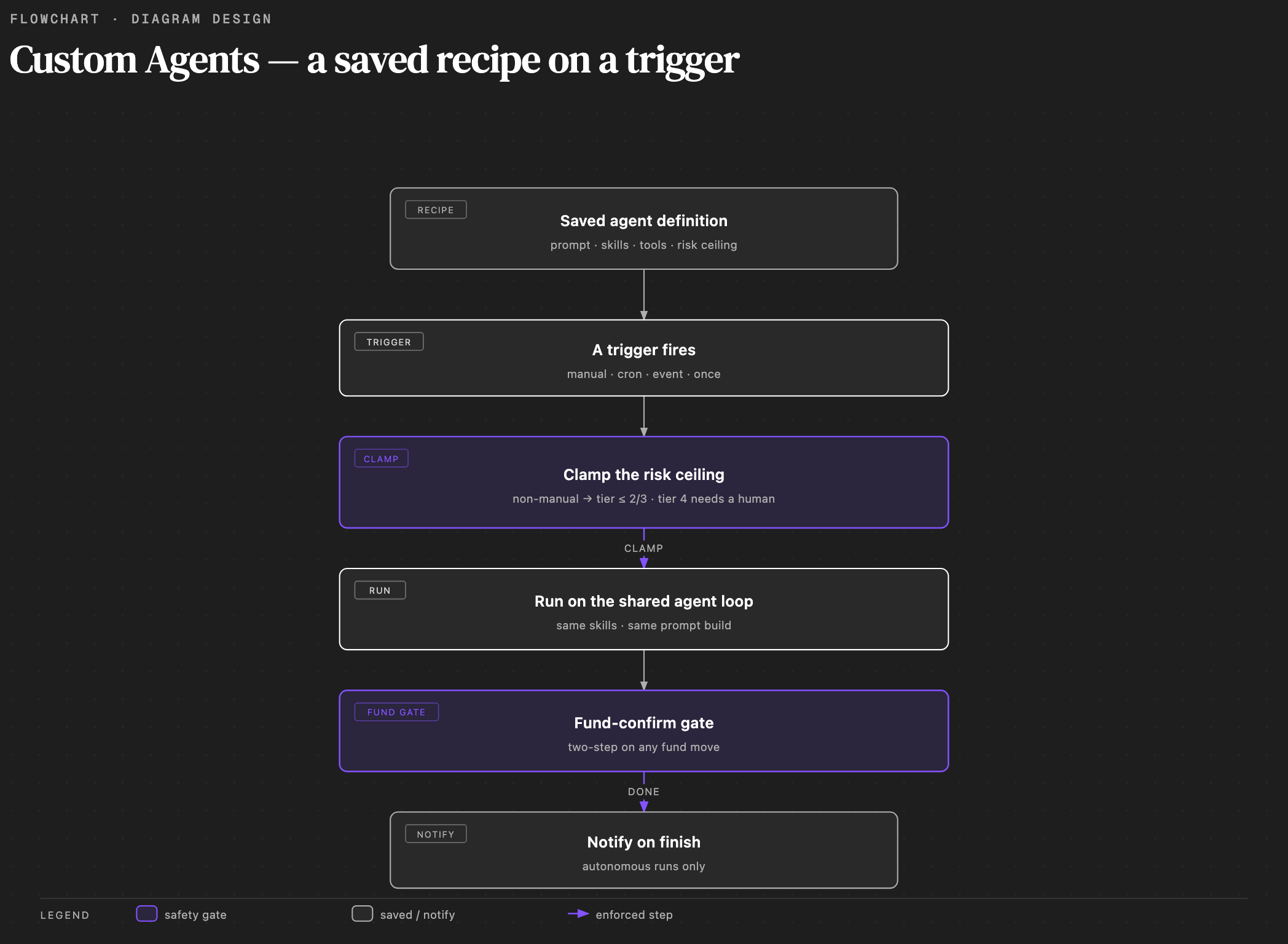
🟢 Configurable — a Custom Agent is a recipe, not a separate runtime. It runs on the same agent loop, the same skill registry, and the same fund-confirm gate as the REPL session.
A Custom Agent is a saved bundle of:
- a
system_prompt(instructions the agent runs with) - a
skill_idssubset (which DomainSkills the runner activates) - a
tool_names+tool_setssubset (which tools the runner exposes) - a
risk_tier_maxceiling (1 read-only → 4 manual-only). The Web UI wizard presents this as three choices — Read-only, No fund moves, and Can move funds — where the last offers tier 3 (confirmed spot trades: swap, buy, sell) or tier 4 (all funds, incl. perps, withdraw, autopilot). Scheduled and event agents can't move funds unless they opt in to autonomous fund moves (capped at tier 3, confirmed spot trades); each fund move still requires confirmation. - a
discovery_mode(how aggressively the runner can self-expand) - a
triggerslist (manual, cron, event) - free-form
metadata
The bundle persists in SQLite (agent_definitions). It is runnable
from REPL /agents run, CLI minara agents run, HTTP
POST /v1/agents/:id/runs, the Web UI Run drawer, a workflow step
(agent_turn { agent_id }), or a cron / event trigger.
Custom Agents are closer to Claude Code subagents than to Anthropic's Managed Agents API: they execute locally inside the same process as the main agent, share the same skill catalog, and inherit the same safety envelopes. They are not a sandboxed third-party runtime.
Why operators want them
- Reuse: encode a recurring task once. "Daily ETH morning brief", "Weekly portfolio review", "On-chain inflow watcher" — each lives as a named agent you launch with one click.
- Scoped tool surface: a researcher agent only needs read-only
skills (no
swap_tokens). A treasury agent only needs Hyperliquid perps. Smaller skill sets mean tighter system prompts, fewer irrelevant tool calls, and lower token cost per turn. - Triggers: an agent attached to
cron: "0 9 * * *"runs every morning without operator intervention. An agent attached toevent: { event_name: "price.alert" }fires when the event bus publishes a match. - Workflows compose them: a multi-step workflow can reference
agent_turn { agent_id: "research-bot" }instead of inlining the research prompt — the workflow author owns the flow, the agent owns the reasoning. - Shareable: drop a JSON file in
~/.minara/agents/and the loader picks it up on the next boot. Export yourresearch-botto a teammate; their instance loads it assource: "file:...".
Three discovery modes
The discovery_mode controls how the runner treats skill_ids and
tool_names at execution time.
New agents default to free_discovery: like the main assistant, the
agent discovers the skills it needs, so the Web UI wizard doesn't ask
you to pick any up front. Tools follow from the selected skills plus
the risk_tier_max ceiling, so tool_names, tool_sets,
and discovery_skill_pool are advanced fields you set via the JSON
file loader or the HTTP API, not the wizard.
constrained
Hard whitelist. The runner activates exactly the declared skill_ids
and exposes exactly the declared tool_names (intersected with the
union of tool_sets). The activate_skills meta-tool is disabled,
so the LLM cannot self-expand mid-turn.
Pick this for production reliability. The agent runs the same shape every time. Easy to review, easy to test, easy to budget.
scenario_aware
Retained for back-compat; behaves identically to constrained today.
The scenario classifier that used to preload skills per prompt was
retired, so this mode runs the exact declared skill_ids with
activate_skills disabled. Existing agents keep the value; new agents
should pick constrained.
free_discovery (default)
Start from the declared seed set, plus the LLM may call
activate_skills to add skills mid-turn — bounded by
discovery_skill_pool glob patterns (empty/missing = the whole
catalog) and clamped by risk_tier_max.
Use sparingly: it gives the agent the full skill catalog as a solution space, which is powerful for open-ended research and brittle for narrow recurring jobs.
Safety invariants across all three modes
risk_tier_maxis enforced at trigger time by the runner, not just at upsert time. Even if youUPDATE agent_definitions SET risk_tier_max = 4directly in the DB, a cron / event / autopilot trigger still clamps the effective ceiling to 2.- The fund-confirm gate reads the agent run's context. A test run
forces the two-step confirm even when
MINARA_SKIP_FUND_CONFIRM=1is set in the environment. - Archived agents fail-closed. Any in-flight
agent_turnstep that references an archived agent continues against its stored snapshot, but new runs against the archived id fail immediately.
Triggers
Each agent has a triggers list. v1 ships four kinds.
| Kind | Shape | Fires when |
|---|---|---|
manual | { kind: "manual" } | You click Run in the UI / type /agents run / POST /v1/agents/:id/runs |
cron | { kind: "cron", expr: "0 9 * * *", timezone?: "UTC" } | The TriggerManager tick crosses the cron expression |
event | { kind: "event", filter: { event_name: "price.alert", payload_match?: {...} } } | The event bus publishes a matching event |
once | { kind: "once", fire_at: 1717430400000 } | The wall-clock time reaches fire_at (unix ms). Fires a single time, then the agent archives itself |
A once agent is how a reminder is modeled. It fires one time, then
archives so it never fires again. Restoring a fired reminder does not
replay it. Reschedule it (set a new fire_at) or run it manually. For a
repeating reminder, use a cron trigger instead.
Safety rule: by default any non-manual trigger forces
risk_tier_max ≤ 2 at upsert time, so a scheduled / event agent can't
move funds. An agent can opt in to autonomous fund moves
(allow_autonomous_fund_moves: true, which requires
confirm_autonomous_fund_moves: true on the same write); that raises the
non-manual ceiling to ≤ 3 (confirmed spot trades). Tier 4 (perps,
withdrawals, autopilot) always requires a manual trigger, so a human is
in the loop when they fire. The store rejects the write with a clear
error if you exceed the ceiling.
Notifications
When a run finishes, Minara can tell you two ways.
In-app notification center. The bell in the top-right shows an unread count and a list of recent agent runs. Each entry links to the run that produced it. It is always on, updates live, and keeps a short history you can mark read or clear.
Browser notifications. Turn on "Browser notifications" in Settings → General, or from the bell's quick toggle, to get a system notification on your desktop when the Minara tab is in the background or minimized. When you are looking at the Minara tab, the alert shows as an in-app message instead. The browser asks for permission the first time. Nothing arrives once you close the tab or quit the browser, and the page must be secure (HTTPS), with localhost as the exception.
Which runs notify. A notification fires for runs an agent makes on its
own: scheduled runs (cron), event triggers, one-off reminders, and workflow
steps. A run you start yourself does not, since you are already watching it:
the Run button, /agents run, or a chat turn. Test runs never notify.
Per-agent control. Each agent has an "In-app notifications" setting. Turn it off for a noisy agent, or choose to be told only when a run fails. New agents have it on.
Workflows that reference agents
A workflow agent_turn step has two forms:
// Preferred: reference an existing Custom Agent by id
{ "kind": "agent_turn", "agent_id": "research-bot",
  "input": { "ticker": "ETH" } }

// Legacy fallback: inline goal — the engine spins up a one-shot
// agent with no scoped skill / tool subset
{ "kind": "agent_turn", "goal": "summarize recent ETH news" }
When to use agent_turn { agent_id } vs tool_call
Use agent_turn when the step needs reasoning, multi-tool
exploration, or natural-language output: research, drafting,
classification, summarization.
Use tool_call when the step is a single deterministic action
on a known input: a swap, a transfer, a balance check, a price
fetch. Tool calls are faster, cheaper, and stay on the existing
fund-confirm gate without re-litigating the confirmation context
across an LLM turn.
A workflow that "shorts ETH then writes a strategy note" splits
into two steps: a tool_call { tool: "open_perps_position" }
for the execution, then an agent_turn { agent_id: "strategy-note" }
for the writeup.
The automation skill enforces this matrix
automatically — it surfaces the catalog of Custom Agents and
routes "drafting" / "research" / "summarize" intents through
agent_turn, and routes fund-moving intents through tool_call.
CLI
The minara agents subcommand exposes the full lifecycle.
| Action | Shape | Purpose |
|---|---|---|
list | minara agents list [--archived] | Print every registered agent |
get | minara agents get <id> | Dump the full definition as JSON |
create | minara agents create --from <file.json> | Insert from a JSON file |
update | minara agents update <id> --from <patch.json> | PATCH; bumps version on meaningful change |
archive | minara agents archive <id> | Soft-delete; tears down attached triggers |
run | minara agents run <id> [--input "..."] [--test] | Launch an ad-hoc run; streams events to stdout |
export | minara agents export <id> | Print the JSON for piping into a file |
import | minara agents import [--from <file.json>] | Inverse of export; reads stdin when --from is omitted |
run opens a synchronous event stream until the workflow completes
or fails, then prints the final __adhoc__ output payload. Pipe-
friendly for cron / shell scripts.
minara agents export research-bot > research-bot.json
scp research-bot.json bob@host:~/.minara/agents/
ssh bob@host minara agents list           # research-bot appears with source=file:...
REPL
The /agents slash command is the interactive counterpart.
| Form | What it does |
|---|---|
/agents or /agents list | List every registered agent |
/agents create | Interactive collectArgs flow: name → system prompt → skill picker |
/agents run [<id>] [<input>...] | Run an agent; live picker if <id> omitted |
/agents archive [<id>] | Archive; live picker if <id> omitted; y/N confirm |
The /agents create flow uses the standard
collectArgs
pattern — required fields prompt one at a time, validators re-ask on
bad input, three empty answers cancel.
Web UI
The Web UI lists Custom Agents at /agents under the AUTOMATE
nav group (alongside Workflows and Autopilot). See /agents in the
web UI.
- List page — every registered agent as a card with name, risk ceiling, discovery mode, trigger summary, and per-card Run / Edit / Archive actions. An Import button accepts a JSON file upload; a New button opens the wizard.
- Wizard (3 steps) — Step 1 picks a starter template (researcher / treasury sentinel / drafting) or "blank". Step 2 names the agent, writes the system prompt, and picks skills (only the hard-whitelist mode shows the picker). Step 3 chooses the discovery mode, risk ceiling, and trigger kind, with the safety clamp shown inline.
- Detail page — Overview / Definition / History tabs. The
Definition tab shows the live JSON; PATCH edits bump
versionatomically. - Run drawer — opens from any list card or the detail page.
Inline SSE event stream shows
workflow:started→workflow:stepevents → terminalworkflow:completed/workflow:failed. Run as test (?test=1) is a checkbox; test runs surface the fund-confirm modal even when the env var skip is set.
REST endpoints
The HTTP gateway exposes the same surface for non-CLI integrations.
| Method | Path | Purpose |
|---|---|---|
GET | /v1/agents | List definitions (?archived=true returns archived only) |
POST | /v1/agents | Create — body is an AgentDefinitionInput |
GET | /v1/agents/:id | Get the latest definition |
PATCH | /v1/agents/:id | Update; body is a partial AgentUpdatePatch |
DELETE | /v1/agents/:id | Archive (soft-delete; reversible) |
POST | /v1/agents/:id/restore | Restore an archived agent (re-arms triggers) |
DELETE | /v1/agents/:id/permanent | Delete permanently (irreversible; run history survives) |
POST | /v1/agents/:id/runs | Start an ad-hoc run; append ?test=1 for test mode |
GET | /v1/agents/:id/runs | List past runs (workflow instance history) |
GET | /v1/workflows/:id/instances/:iid/events/stream | SSE event stream for a running instance |
The SSE endpoint is the same one used by the Web UI Run drawer. It
transparently filters events to the single instance_id.
Example: create via curl
curl -X POST http://localhost:8080/v1/agents \
  -H "Authorization: Bearer $GATEWAY_AUTH_TOKEN" \
  -H "Content-Type: application/json" \
  -d @research-bot.json

# Kick off an ad-hoc test run
curl -X POST "http://localhost:8080/v1/agents/research-bot/runs?test=1" \
  -H "Authorization: Bearer $GATEWAY_AUTH_TOKEN" \
  -H "Content-Type: application/json" \
  -d '{ "input": "summarize recent ETH news" }'
AgentDefinition JSON example
{
  "id": "research-bot",
  "name": "Daily Research Bot",
  "description": "Morning brief: trending tokens, macro context, watchlist signals.",
  "system_prompt": "You are a markets research assistant. Output a 5-bullet brief covering crypto majors, US equities open, and any flagged watchlist alerts. No advice; observation only.",
  "skill_ids": [
    "analysis.market_overview",
    "research.knowledge_base",
    "minara.core"
  ],
  "tool_names": ["get_price", "get_trending", "search_listed_tokens", "search_dex_tokens"],
  "tool_sets": ["market_data"],
  "risk_tier_max": 1,
  "discovery_mode": "constrained",
  "triggers": [
    { "kind": "cron", "expr": "0 9 * * *", "timezone": "UTC" }
  ],
  "metadata": {
    "tags": ["research", "daily"],
    "owner": "[email protected]"
  }
}
Notes:
risk_tier_max: 1(read-only) suits a cron-triggered agent that only reads market data. A scheduled agent is capped at tier 2 by default, or tier 3 if it setsallow_autonomous_fund_moves. Raising it past that ceiling is rejected at upsert.discovery_mode: "constrained"means the runner will not callactivate_skillsmid-turn. The skill / tool surface is exactly what's declared.tool_sets: ["market_data"]layers in every tool in that set alongside thetool_nameswhitelist. The runner takes the union.
Workflow JSON with agent_turn { agent_id }
{
  "id": "morning-brief",
  "name": "Morning Brief",
  "version": 1,
  "steps": [
    {
      "id": "step_1",
      "kind": "tool_call",
      "tool": "get_portfolio_snapshot",
      "input": {}
    },
    {
      "id": "step_2",
      "kind": "agent_turn",
      "agent_id": "research-bot",
      "input": {
        "portfolio_summary": "{{ steps.step_1.output }}"
      }
    },
    {
      "id": "step_3",
      "kind": "tool_call",
      "tool": "send_telegram",
      "input": {
        "text": "{{ steps.step_2.output }}"
      }
    }
  ]
}
The workflow author wires the flow; research-bot owns the
reasoning. When step 2 first executes, the engine snapshots the
agent definition into workflow_instances.agent_def_snapshot —
later PATCHes to research-bot do not affect this in-flight
instance. New runs pick up the new version.
JSON file sharing
The agent loader scans ~/.minara/agents/ (or
$MINARA_DATA_DIR/agents/) on boot. Every *.json file that parses
as an AgentDefinition lands in the store with
source: "file:<absolute_path>".
File-sourced rows are PATCH-locked: REST and CLI updates against them are rejected with a clear error. Edit the file on disk, then restart the agent (or call the loader sync endpoint) to pick up the change. This guarantees the file stays the source of truth — no silent drift between disk and DB.
Removing the file archives the row on the next sync, so file-deletes do not break workflows that already snapshotted the agent.
Safety posture (summary)
- Runtime risk clamp — non-manual triggers (cron, event,
autopilot) clamp
effective_risk_tier_maxto 2, or to 3 when the agent setsallow_autonomous_fund_moves. The clamp runs in the AgentRunner immediately before the LLM turn, after the trigger source is resolved. Tier-4 tools stay blocked for autonomous sources at the registry gate. - Context-aware fund-confirm — every fund-moving tool call
routes through the fund-confirm gate. In a test run the gate
forces the two-step confirm regardless of
MINARA_SKIP_FUND_CONFIRM. Test runs never silently move money. - Archived agents fail-closed — a manual run against an archived
agent fails immediately. A cron trigger on an archived agent skips
three times in a row, then the trigger is automatically
deactivated. In-flight
agent_turnsteps continue against their stored snapshot — archiving is a future-only operation. - Snapshot isolation — workflow instances that reference an
agent by
agent_idsnapshot the full definition at first execution. Later PATCH or ARCHIVE on the source agent does not affect any in-flight instance. - Audit log — every run writes the requested risk tier, the
effective (clamped) risk tier, the trigger source, and the lists
of dropped skills / tools to the audit log. The Web UI surfaces
these on the History tab; the CLI surfaces them via
minara agents get <id>followed by an instance query.
See Fund-Moving Confirm for the handler contract and Audit & Overrides for the full audit surface.