 MINARA
Data Studio
Build, review, preview, and publish live financial dashboards from natural language
🟢 Beginner friendly. Data Studio builds read-only dashboards. It never places trades, transfers funds, connects a wallet, or asks for private keys.
Data Studio turns a plain-language request into a React dashboard with live or load-once financial data. The project includes a plan, source code, a verified build, and a shareable local site when you choose to publish it.
Use it for market monitors, watchlists, rankings, earnings tables, portfolio views, heatmaps, K-line charts, risk views, yield curves, order-book depth, and other dashboards that benefit from a reusable interactive page.
Current workflow
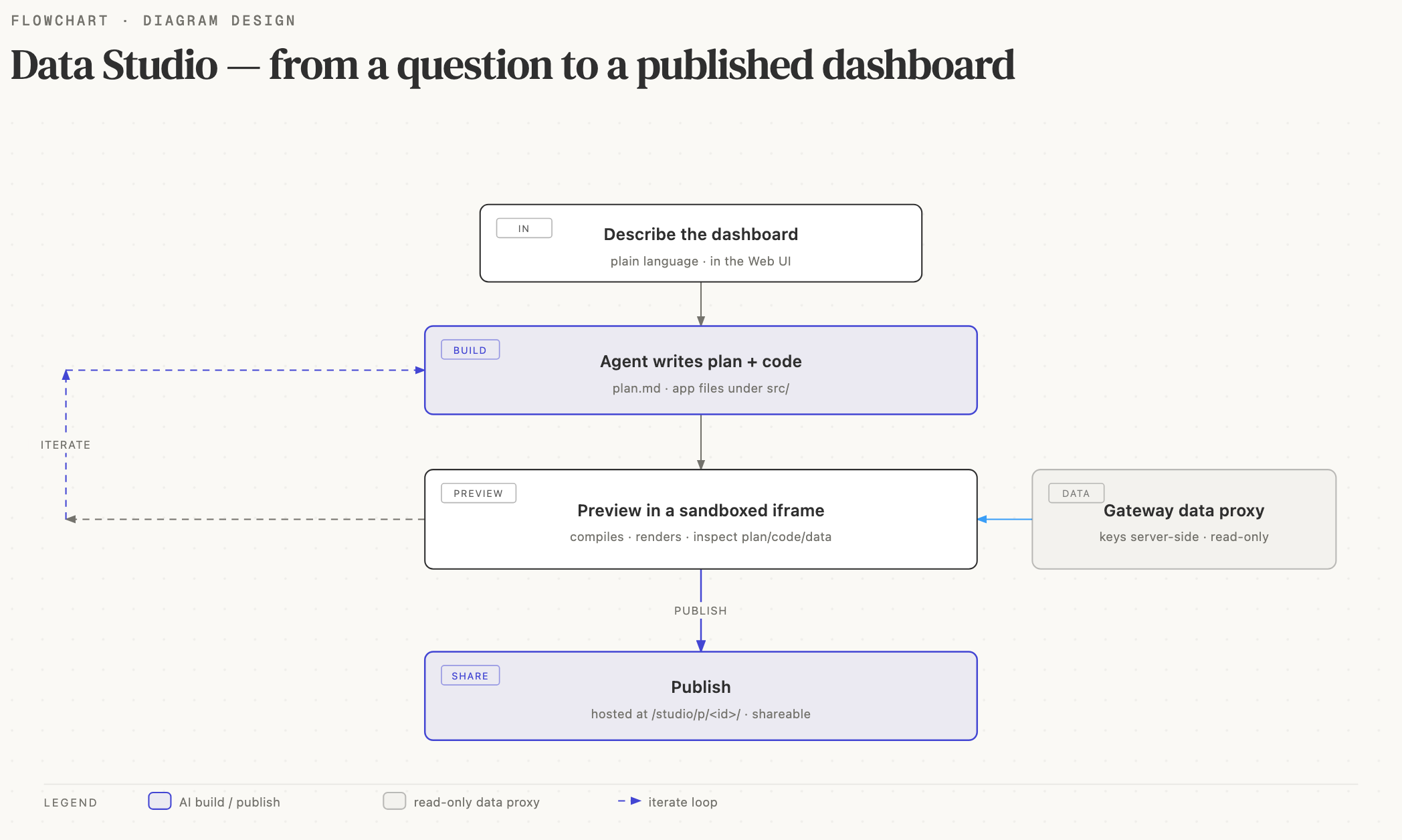
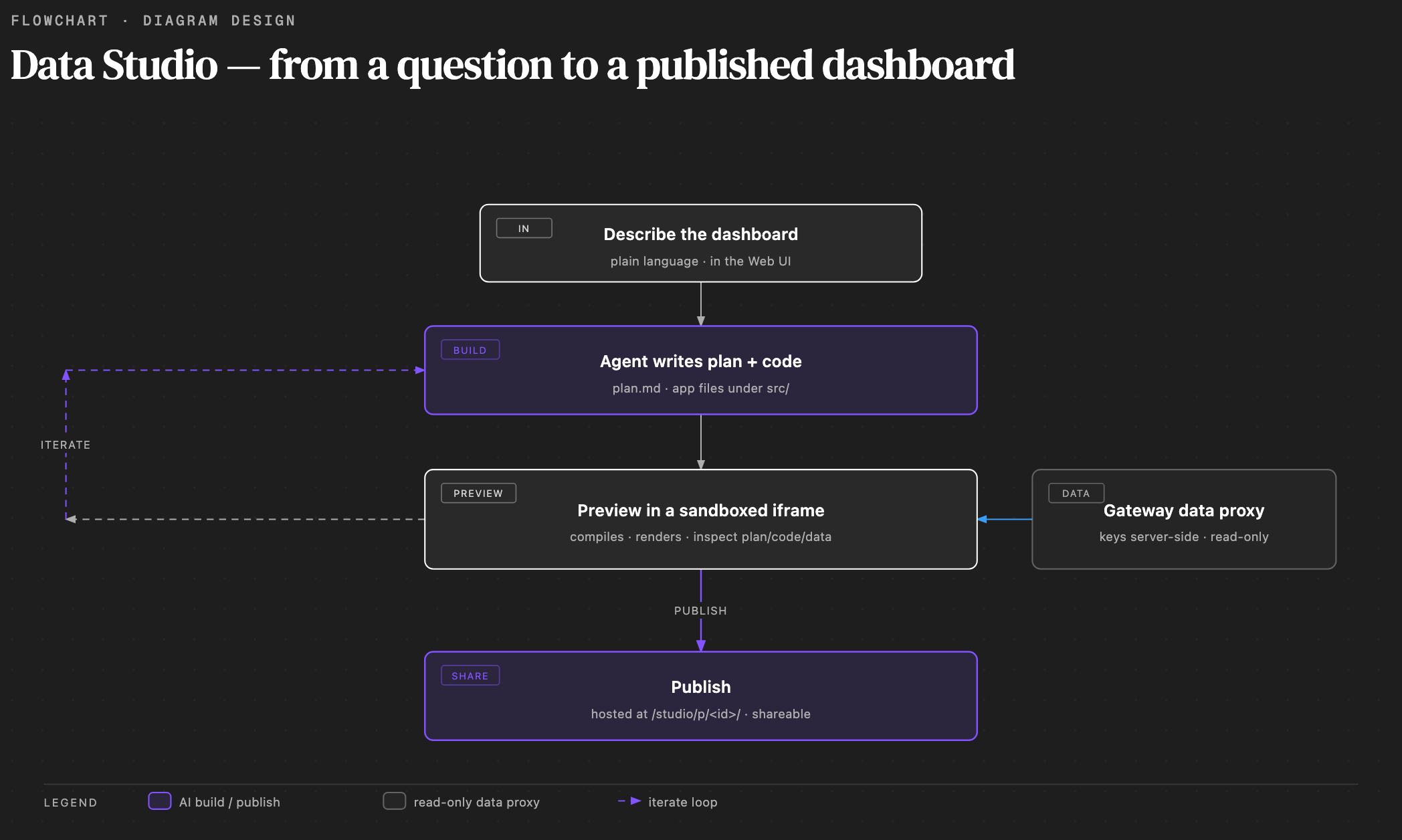
- Open Data Studio, describe the dashboard, and optionally attach reference images.
- Choose Plan or Auto in the composer.
- The agent creates a project plan, resolves data and component contracts, writes the source, and runs deterministic build and preview checks.
- Review the result in Preview, Code, Plan, Data & stats, and Settings. Continue chatting to change the same project.
- When the preview is ready, publish a frozen version to a customizable local link.
The chat uses the same work-log and tool presentation as the main Chat module. After a successful turn, the dashboard delivery card appears at the end of the agent response. It opens the preview and includes an entry to the project root.
Plan and Auto modes
Plan prepares the full proposal first. As soon as the plan is saved, Data Studio opens the Plan tab. You can inspect the plan, preview its deliverable, and request revisions before approving execution. Approval starts a new agent turn with the normal Data Studio tools available.
Auto starts implementation immediately. The agent still saves plan.md in
the project and follows the same data, component, build, and preview checks. You
can switch modes for later requests. Plan mode is a choice, not a permanent
default.
Project files and versions
Each project lives in Minara's stable workspace, separate from temporary Git worktrees and runtime directories. The project keeps:
- the current
plan.md; - generated source under
src/; - immutable successful build versions and the latest preview artifact.
Uploaded session files use a separate durable recovery store, so image and file references remain available after a process restart.
Open Code → Project root to locate the project directory. A build becomes a version only after its component contracts, compilation, and required runtime checks pass. Failed fixes do not replace the last good preview.
Data Studio opens Preview when you return to a project. If source exists but the preview artifact is missing after a restart, it attempts one automatic rebuild while showing the normal preview loading state. If that attempt fails, the empty state offers Restore for a manual retry. If only a plan exists, the preview empty state links to the Plan tab.
Data access and refresh rules
Generated code uses the allowlisted Data Studio SDK. Provider credentials stay on the local gateway or publisher and never enter generated source.
Data Studio selects the data path from the requested behavior:
- For real-time data, it prefers a registered public, no-key WebSocket that supplies every required field.
- A no-key public API may load once or poll at the provider's allowed interval.
- An API that uses your own configured key may load once or poll.
- If a supported keyed provider has no local key, Minara data forwarding can supply a load-once response. Settings marks that provider as Using Minara data forwarding.
- Minara forwarding never polls. A request that requires polling must use a public API or your own key.
HTTP data loads once by default. When a dashboard refreshes often, Data Studio shows the interval and a usage notice. Existing valid data remains visible during refreshes. Charts and cards update in place instead of remounting or replaying a full-page loading state.
Use Data & stats to inspect calls, errors, and latency. Use Settings to see whether each project data source is public, using a local key, using Minara forwarding, or unavailable. API keys are managed centrally in Settings → API Keys.
Financial UI and chart rules
Generated dashboards use fixed @minara/studio primitives and one shared chart
theme. Before writing code, the agent reads the current component schemas and
types. After generation, an automatic contract review blocks unknown props,
missing required fields, invalid imports, and unsupported JSX spreads.
The component set covers common financial questions:
MetricCard,SignedValue, andSparklineChartfor point values and small trends;LineChart,AreaChart,KLineChart,MixedLineBarChart, andPerformanceChartfor time series, price/volume, performance, and drawdown;HorizontalBarChart,DataTable,AssetHeatmapChart,MatrixHeatmapChart, andHistogramChartfor ranking, detail, market maps, correlation, and distributions;OrderBookDepthChart,VolumeProfileChart,YieldCurveChart,RangeBandChart, andVolatilitySurfaceChartfor specialized financial views.
PnL, change, return, and other signed values show both their sign and financial direction color. Value changes use a short color transition without flashing the whole card. Currency and other measured values always include a unit, including amounts displayed inside heatmaps. Color is never the only signal.
The shared theme owns axes, grid lines, tooltips, legends, typography, spacing,
positive and negative colors, and animation. A generated project can override
the public --studio-chart-* variables in its global CSS without rewriting
individual chart options. Every completed dashboard is checked at desktop and
390 px mobile widths, including loading, empty, partial-failure, and refresh
states.
Publish and share
The publish form creates a short site ID from the project. You can replace it before publishing. Anyone with the link can open the site without signing in.
Two options are enabled by default and remain editable after publishing:
- Allow access from your local network binds the publisher to the LAN and shows a link using this computer's LAN IP address and publisher port.
- Keep available after Minara closes keeps the local publisher running and restores published sites when you sign in to the computer.
Turning off LAN access restricts the link to this computer. Turning off background availability makes the site depend on the active Minara client. Unpublish revokes every link for the project and stops serving that site.
Published sites are local or LAN-hosted. LAN access does not expose the site to the public internet, and the host computer must remain powered on and reachable.
Safety boundary
Data Studio can request allowlisted read-only data and write inside its own project directory. It cannot:
- call wallet, trading, swap, withdrawal, or order tools;
- connect MetaMask, WalletConnect, or another browser wallet;
- embed API keys or other secrets in generated files;
- request arbitrary third-party URLs from the preview;
- add transaction or fund-moving controls to a published dashboard.
Use Chat, Portfolio, Trading, Strategy Studio, or Autopilot for execution. Those modules apply their own preview and confirmation gates.