 MINARA
Strategy Studio
Describe a trading idea in plain words, let the AI write and backtest a strategy, then run it on paper or live
🔴 Advanced — a live strategy opens and closes real positions on its own. ⚠️ Risk Disclaimer: Strategy Studio trades perpetual futures, which use leverage. You can lose money, including more than you expected in a fast market. Backtest results are historical and do not predict future returns. Test on paper first, start small, and watch the first few days.
Strategy Studio turns a plain-language trading idea into a working strategy. You can start from plain language, from formally approved factors, or from both. The AI writes the strategy and backtests it, and you review the results. When you are ready, you deploy it to paper (simulated funds) or live (real funds), and watch it run.
Start with factors or an idea
Open the factor library before generation to choose up to 12 factors that passed Basic Qualification Evaluation. The first factor establishes the asset class, data interval, and prediction-horizon constraints. Incompatible factors remain visible but cannot be selected together.
Each factor card shows its admission IC. This is the frozen, direction-adjusted OOS Rank IC from the exact passing evaluation, not a live metric that changes with later evaluations. The agent can test a smaller subset of the selected candidate pool when it builds the strategy.
Factor selection is optional. You can still submit a plain-language idea with no selected factors. If you need to discover a new signal first, start a Factor Research campaign, evaluate the candidates, and return to the approved factor library.
How it works
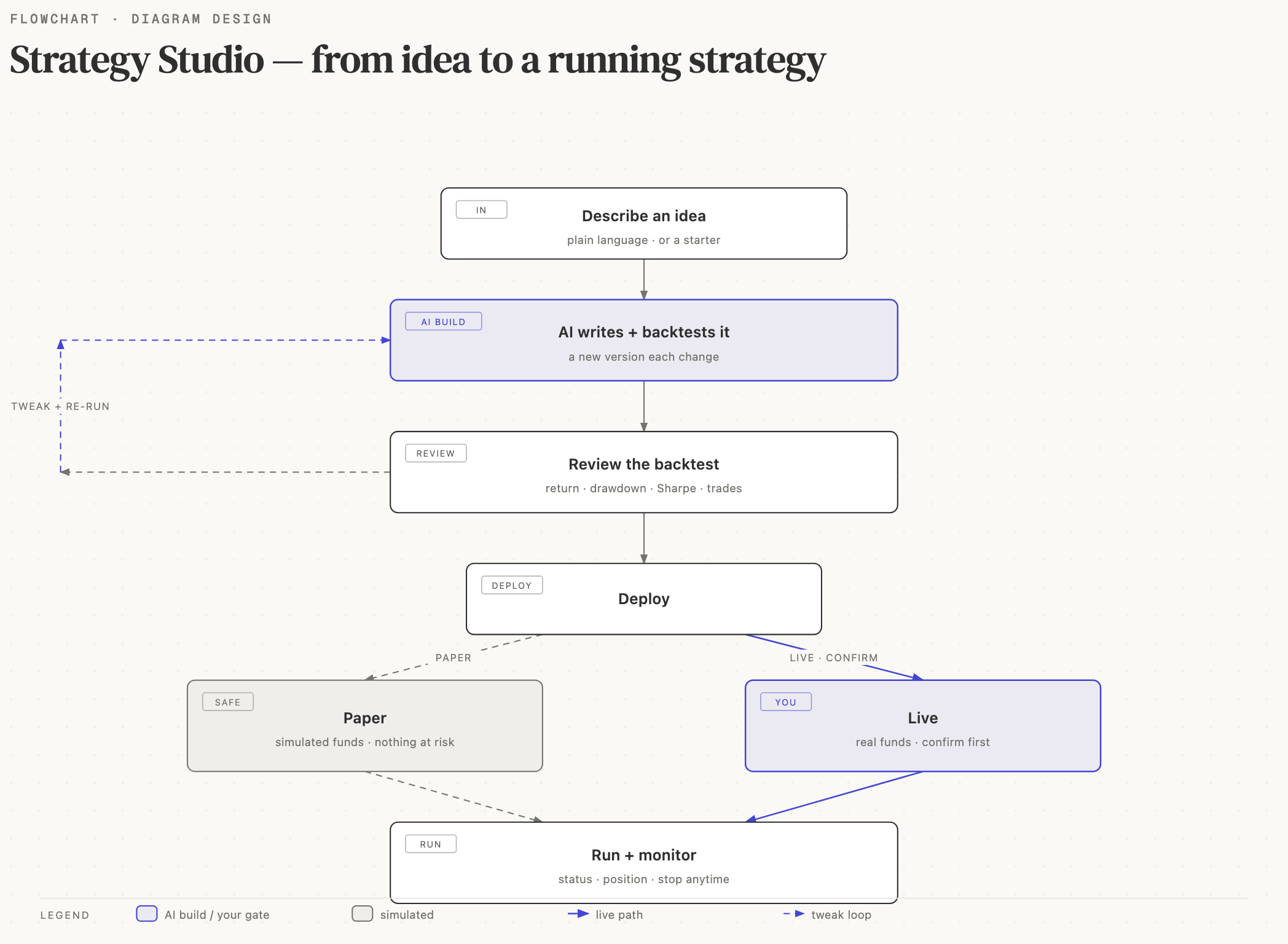
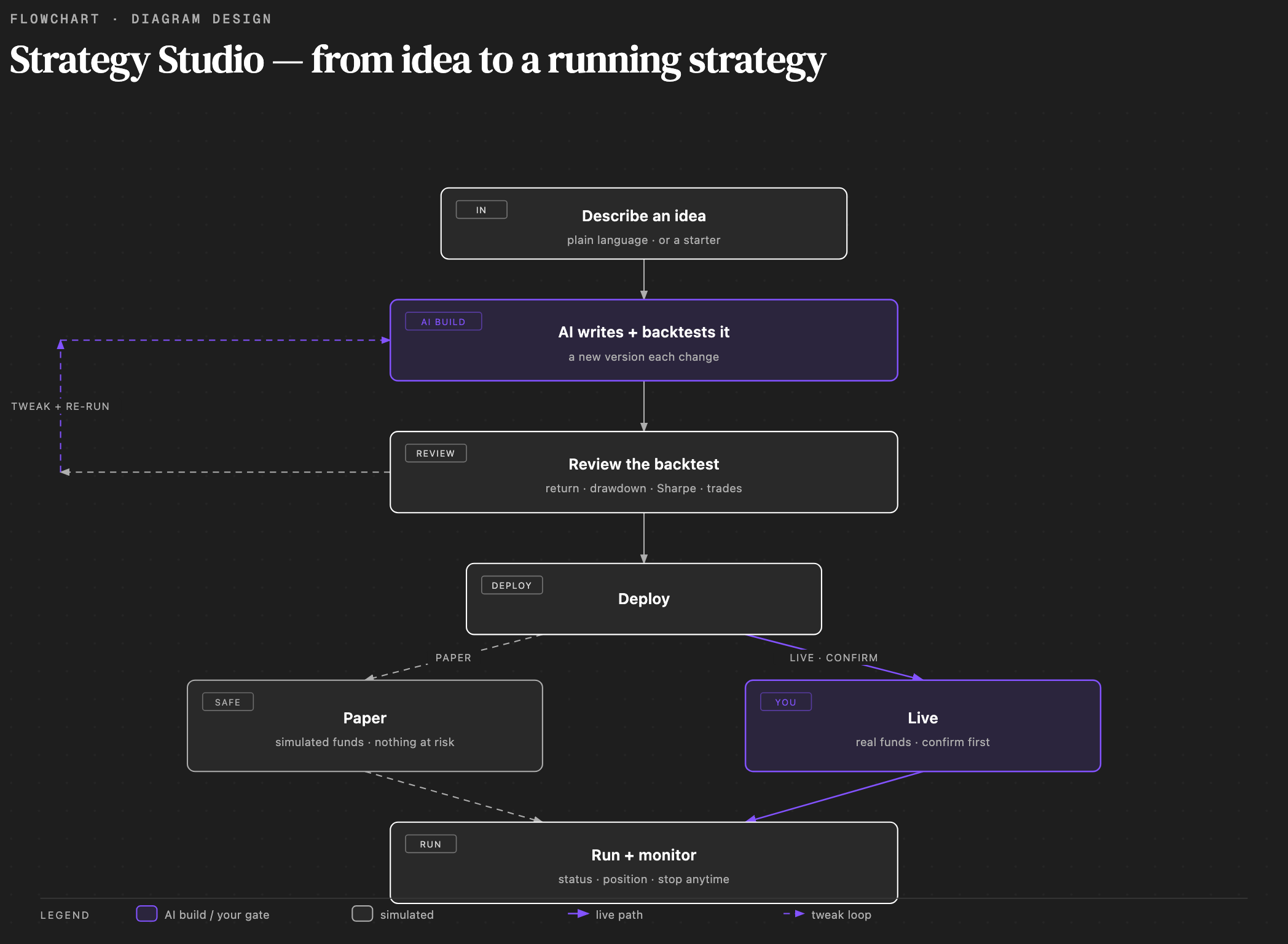
- Describe an idea and choose factors. Type something like "Buy BTC when RSI drops below 30 and sell when it rises above 70." You can also open the factor library and select approved factors for the candidate pool.
- The assistant builds it. The AI chooses a compatible subset when needed, writes the strategy, runs a backtest, and streams its progress into the chat. A new version appears each time it makes a change.
- Review the backtest. The Backtest tab shows the return, max drawdown, Sharpe, win rate, profit factor, and trade count, plus an equity curve and the full list of trades. Adjust the trading pair, timeframe, or leverage and run it again.
- Read the code. The Code tab shows the strategy in plain view so you can see exactly what it does.
- Deploy. Choose Paper to run a simulation with no real money, or Live to trade for real. Live deployment always asks you to confirm first.
- Monitor. The Live tab shows the strategy's status, its open position, and its recent trades. Stop it any time.
Talking to the assistant
The chat panel on the right is how you change a strategy. Ask for a tweak in plain words ("add a stop-loss at 5%", "use a 4-hour timeframe", "only trade long"). The assistant edits the strategy, re-runs the backtest, and shows you the new version. Your conversation and every version are saved, so you can come back to a strategy later.
Paper and live
- Paper runs the strategy against real market data with simulated funds. Nothing is at risk. Use it to watch how a strategy behaves before committing.
- Live places real orders from your selected wallet. Before a live deployment or a live start, Strategy Studio shows a confirmation with what is about to happen and how to choose paper instead. A live strategy keeps trading until you stop it.
When you stop a live strategy, it can close open positions for you. Pause keeps positions open and only stops new trades.
Safety
- Nothing trades until you confirm. Live deploy and live start both require an explicit confirmation step.
- Set a drawdown limit when you deploy. The strategy stops itself if losses pass the limit you chose.
- Start with paper, then start small on live, and watch the first few days.