 MINARA
Workflows
Build reusable Minara automations by chatting in plain English. Retry-with-feedback authoring keeps the saved workflow runnable.
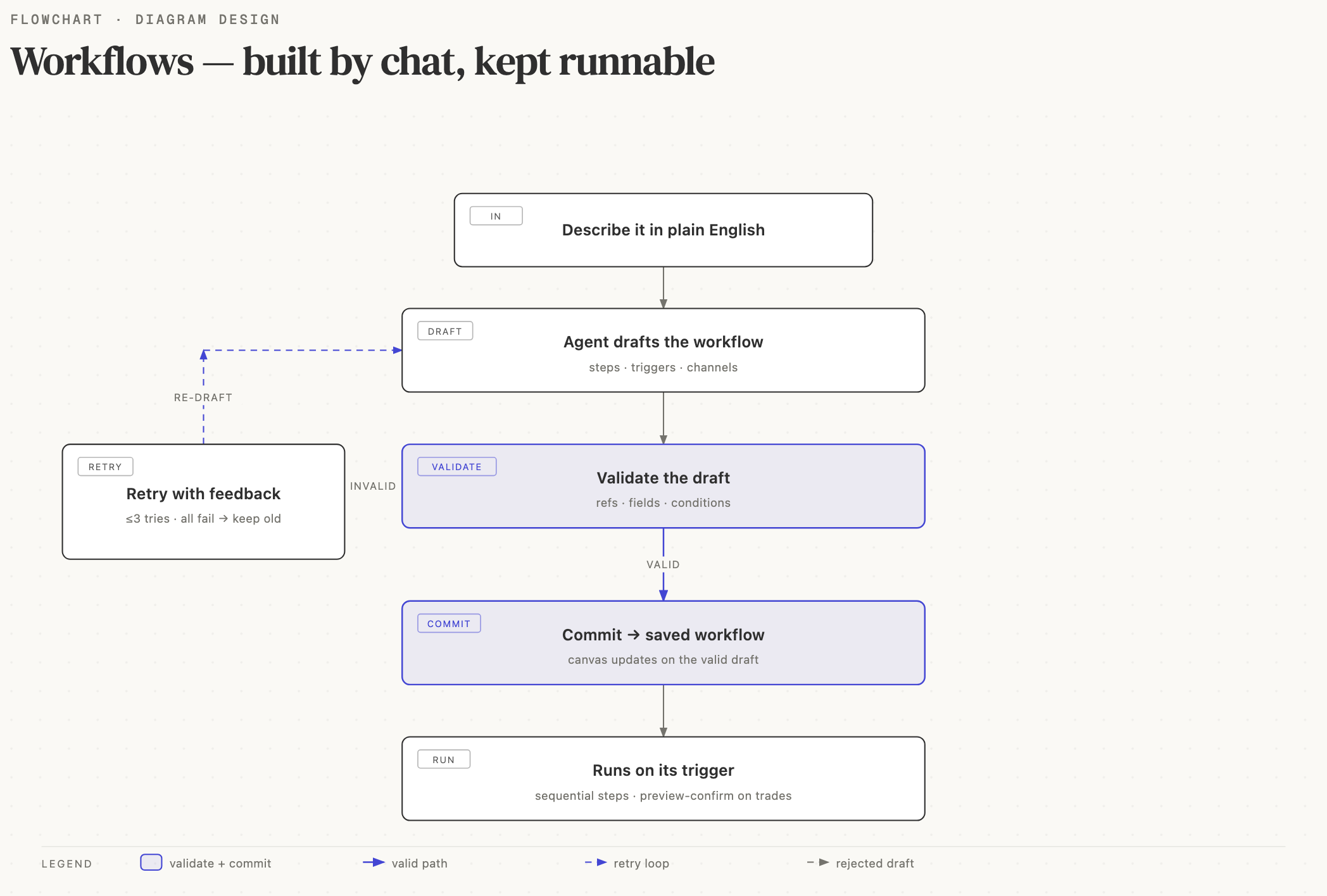
Workflows are reusable Minara automations you build by chatting in plain English. The agent drafts a workflow definition (steps, triggers, notification channels) from your prompt, you watch it build live in the chat panel, and the canvas updates when the draft passes validation.
A workflow can:
- Watch a price (BTC, AAPL, EUR/USD, …) and alert when a threshold crosses.
- Monitor a wallet, a Polymarket trader, or an on-chain event and notify you when activity matches a rule.
- Run a daily / weekly / cron-scheduled brief on your portfolio.
- Place a trade (with the standard preview-then-confirm gate; no silent fund movement).
Building a workflow
Two entry points:
- Landing page form. Paste a plain-language description, submit, the agent drafts the workflow and saves it on success.
- Workflow detail chat panel. Open an existing workflow, describe a change ("add an email send_message after the alert", "switch the schedule from hourly to daily"), the agent rewrites the definition.
In both cases the chat surface streams the work log live. You see each step's raw JSON arrive as the model types it, then collapse into the canonical card the moment the step's required fields are all set. The canvas only mutates when the agent's draft passes validation.
What happens when the agent gets it wrong
The workflow authoring subagent runs up to 3 attempts per
request. If the first draft has a broken reference (a next
pointing to a step that doesn't exist), a missing required field
(a tool_call without a tool), or an unparseable condition
expression, the structural validator catches it, the chat panel
collapses the broken draft into a Attempt 1 · fixed K issues
summary, and a fresh Attempt 2 ▪ ●●● building… section opens
below.
The collapsed attempt isn't deleted. Expanding it shows what the agent tried and the structured error list that doomed it. You can audit the misstep without it cluttering the active view.
Three things never happen during retry:
- The canvas never updates from a broken draft. Canvas truth
is the
workflow.commitevent, which only fires on the attempt that validates. Intermediateworkflow.patchevents are previews; the canvas ignores them. - Discarded attempts never reach the chat panel as cards. The subagent buffers each attempt's events on the server side and drops the buffer if the attempt fails validation. Only the validated attempt's cards land in the chat history.
- The saved workflow definition never gets a broken shape. If all 3 attempts fail, the gateway emits a rollback event and skips the persist; your existing definition stays exactly as it was.
The toolbar above the canvas reflects the phase: Drafting… on attempt 1, Retrying, attempt N of 3… once a retry kicks in, Saving… when the validated draft persists. Run / Schedule / Publish stay disabled until the chat finishes.
Editing an existing workflow
The refine flow preserves your existing parameters. The agent only
touches the fields your message asked it to change. Token
addresses, webhook IDs, custom argument values, and condition
expressions on unchanged steps pass through verbatim. If you ask
for a notification-channel switch, the tool_call steps don't get
their addresses rewritten as a side effect.
If your request is missing a parameter the agent needs to build a runnable workflow (a chain you didn't specify, a provider you haven't connected), it returns a short assistant message asking what's missing instead of guessing. No silent zero-address placeholders, no defaulted-to-ETH-because-you-didn't-say surprises.
Mid-stream refresh
Refreshing the chat panel while a refine is streaming reconnects to the in-flight session and replays the events that already landed. The collapsed attempt sections reload in the same shape you saw live; the work-log skeleton clears the moment chat history loads, even if the underlying refine is still mid-attempt.
Sequential execution model
Every workflow runs sequentially. There's no array-form
next, no native fan-out, no parallel branches. If you ask the
agent to "send a Telegram and an email after the alert", it
chains them: notify_tg → notify_email. The latency between two
chained send_message steps is sub-second in practice,
indistinguishable from parallel for the user.
This is intentional. Fan-out semantics introduce double-fire bugs
in monitoring workflows (a price-monitor webhook firing twice
during a dip can trigger two buy calls if the workflow had a
parallel branch). The sequential model + position-check guards on
fund-moving steps keep the failure modes simple.