 MINARA
Security
How Minara prevents the agent from doing something you'd regret — layered defense, threat model, and what each layer protects against.
This chapter covers technical enforcement around tools, code, and fund movement. For the Chat feature that notices risky user decisions, see Financial safety.
You tell the agent: "run this Python script and show me the output."
It runs. The script might be harmless data work — or its last line
might quietly call minara swap and send 100 USDC to an attacker
contract.
Letting an agent that can move money run code, type commands, and write files on your machine is genuinely dangerous. This chapter is about exactly what Minara does about it, why each defense exists, and where the gaps still are.
Three scenarios that motivate everything below
Concrete attacks make the design make sense:
- Paste attack. A user copies a "useful" script from Discord
or a forum, asks the agent to run it, and somewhere in the
middle a
minara swapis buried. - Multi-step injection. The agent writes a harmless helper
file, then writes one more line appending to it, then runs
python helper.py. Each step looks clean. Together they drain the wallet. - On-chain trap. A script calls
approve(unknown_address, MaxUint256)or signs a Permit2 message. These aren't "obviously malicious" commands — they're the same calls a legitimate DEX integration uses, except the spender field is the attacker.
None of those are caught by a single check. The script runs, the files exist, the contract calls are valid. What stops them is the combination of independent layers below.
Layered defense — four independent gates
Minara runs four independent safety layers in front of every LLM-reachable tool. They are independent on purpose: an attacker who beats one still has to beat the others, and the layers fail in different ways.
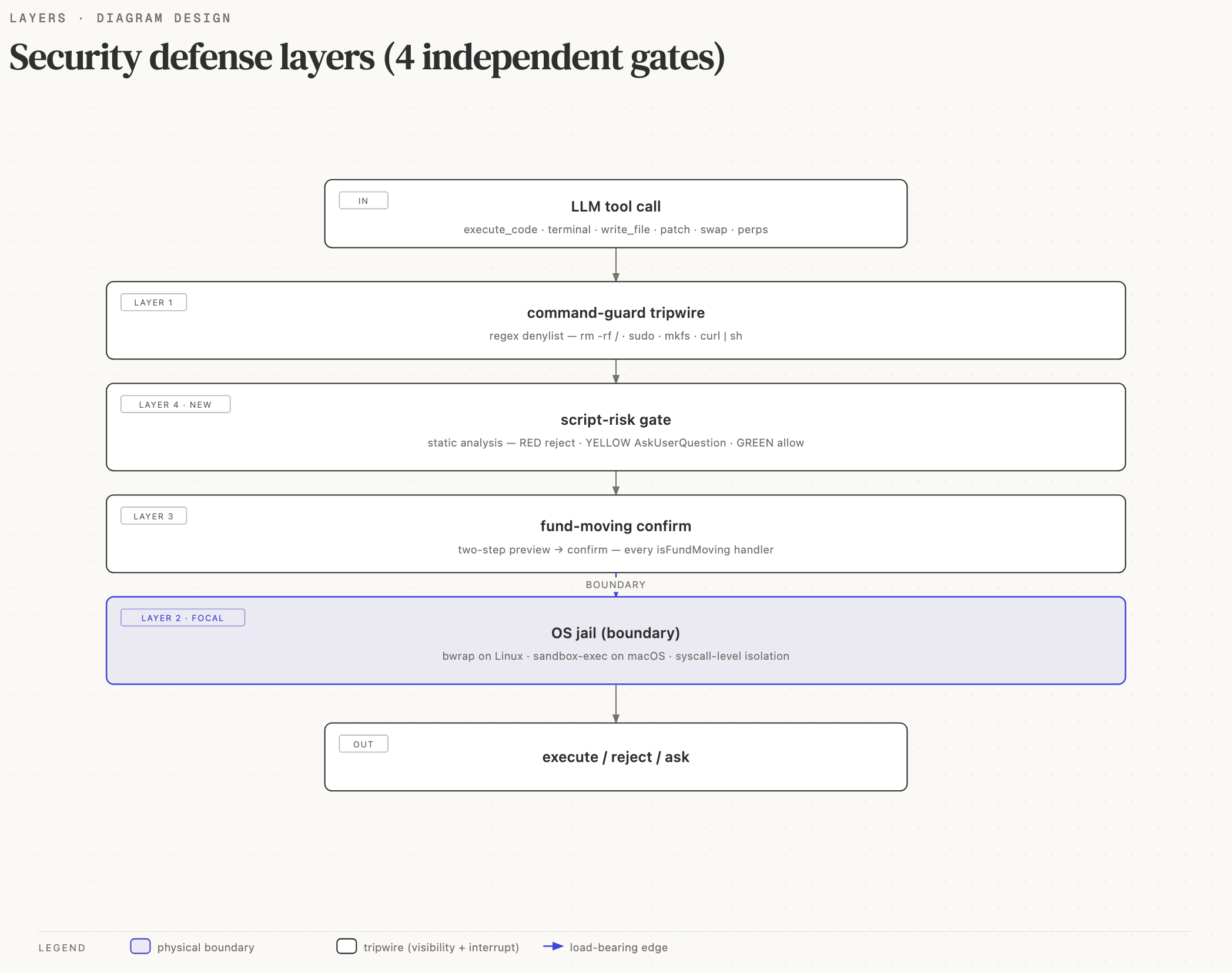
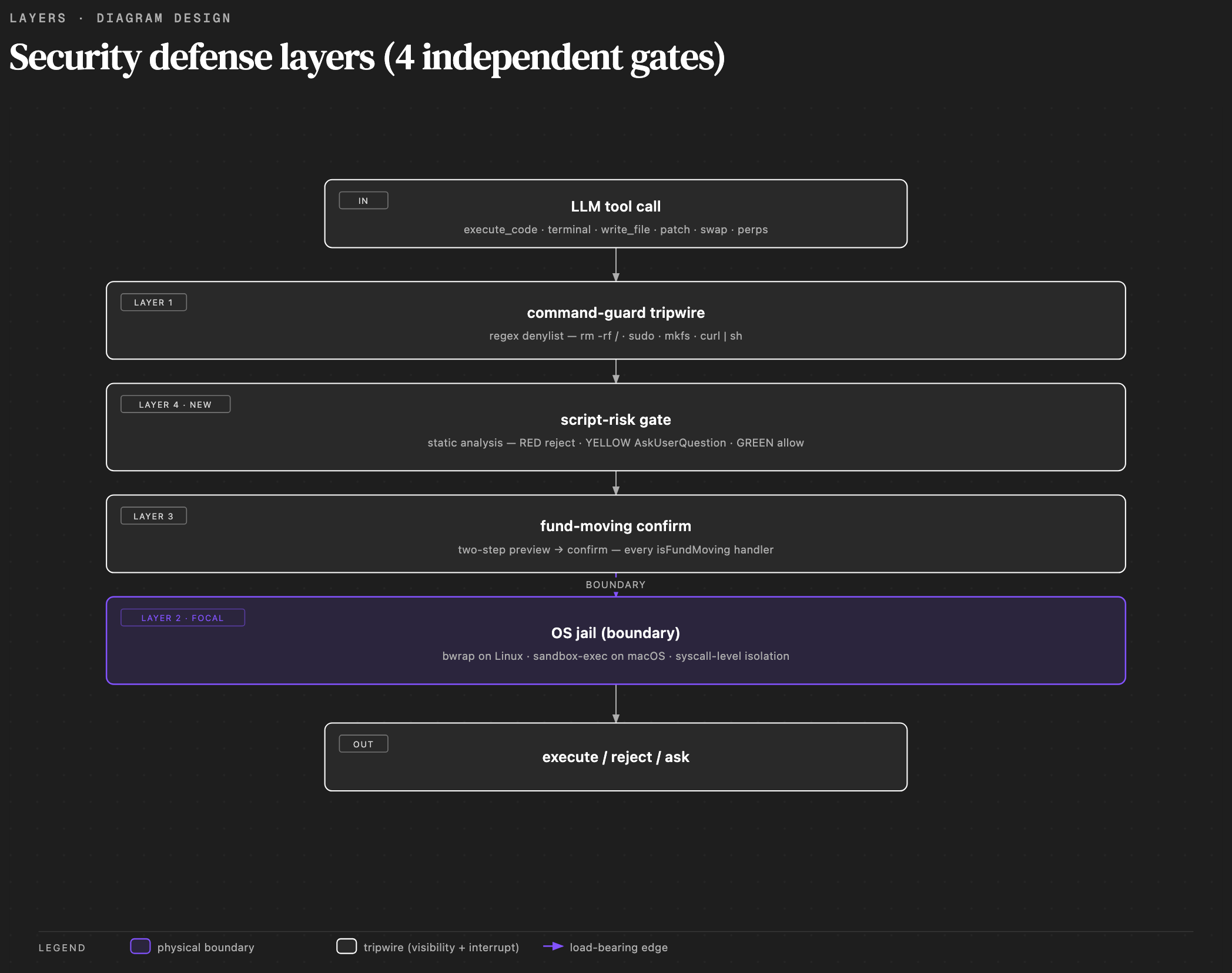
The coral focal layer (OS jail) is the only physical boundary: even if everything above it fails, syscall-level isolation still applies. The other three are tripwires — they add visibility and a chance to interrupt, but a determined attacker can read the source and look for gaps. Defense in depth means the combination is meaningful, not any single layer in isolation.
Layer 1 — command-guard tripwire
Regex denylist on every shell command. Hard-blocks the no-question-
asked patterns: rm -rf /, sudo, mkfs, curl … | sh, fork
bombs. The point isn't that the regex catches everything (it
can't — base64-then-eval slips past). The point is that obvious
accidents and the most common prompt-injection one-liners die
loudly here, leaving the rest for higher layers.
This is a tripwire, not a boundary.
Layer 2 — OS jail (the actual boundary)
Every subprocess spawned by execute_code or terminal is wrapped
in bwrap on Linux or
sandbox-exec
on macOS. Inside that wrapper the process cannot read ~/.ssh,
cannot connect to 169.254.169.254 (cloud metadata), cannot write
outside the workspace directory.
Even if every higher layer is bypassed — wrong regex, prompt injection, sneaky obfuscation — the attack code still has to live inside the syscall set the jail allows. This is what we mean by "physical boundary": it's enforced by the kernel, not by string matching.
Layer 3 — fund-moving confirm (two-step)
Every tool that moves money — swap, buy, sell, transfer, perps, autopilot enable, workflow activate — must be called twice:
- First call (no
confirmparameter): the handler simulates the trade and returns the preview (amounts, route, slippage, gas estimate). It does not broadcast. - Second call (
confirm: true): only now does the handler actually sign and broadcast.
This is enforced inside every handler, not by a polite prompt to
the LLM. The LLM cannot "forget" the rule — calling swap_tokens
without confirm: true simply returns a preview, never a tx hash.
Full details in Fund-moving confirm.
Layer 4 — script-risk gate (new)
Layer 3 catches direct fund-moving tool calls, but what about a
Python script that runs subprocess.run(["minara", "swap", …])?
The shell-out bypasses the in-process tool registry — Layer 3
never sees it.
Layer 4 fills that gap. Before execute_code, terminal,
write_file, or patch runs, the script body is statically
analyzed:
- RED — auto-reject (mass deletion, IMDS / SSRF, credential exfil, container escape, indirect obfuscation + sink, inline private-key signing).
- YELLOW — pause and ask the user (fund-moving CLI shell-out,
approve/ Permit2 / Safe owner change, env-var poisoning, specific-path delete, risky package install). - GREEN — proceed silently (everything else).
Full details in How the agent decides risk.
What Minara does not protect you from
The honest list. None of these are bugs — they're scope boundaries. Knowing them is how you stay alert in the right places.
- Runtime-built payloads. A script that runs
os.system(a + b)whereaandbare computed at runtime — static analysis can't see what the joined string will be. The Layer 2 jail still caps what the subprocess can do, but the gate will flagdynamic_commandas a YELLOW and ask you. Read the script before saying yes. - Malicious smart contracts and DApps. The code layer cannot
know that contract
0xabc…is a drainer or thatcool-dapp.example.comis a phishing clone. That's the parallel job of token / DApp scanning. - Transactions you signed. Layer 3 shows you the preview. If you confirm it, the bytes are signed and broadcast. Read the preview before clicking yes.
- Your own typos and bugs. Minara guards against malicious intent, not against you accidentally deleting the wrong file or sending to the wrong address. The two-step confirm exists so you catch your own mistakes too — use it that way.
What this means in practice
A practical safety calibration for daily use:
- 🟢 Routine and unsurprising. Pandas data work, public HTTPS
GET requests, generating charts from CSVs,
npm ci --ignore-scripts— Minara runs without interrupting you. - 🟡 You'll see a confirmation widget (YELLOW). Scripts that
call
minara swap,cast send, orforge --broadcast; ERC-20approveand Permit2 signatures; specific-path deletes; process substitution likebash <(curl …); settingNODE_OPTIONSorLD_PRELOAD. Read the evidence the gate surfaces, then accept or cancel. - 🔴 Hard-rejected (RED). Mass deletion (
rm -rf *,rm -rf $UNSET/x), reads of~/.ssh/id_rsa, IMDS endpoint access, container escape attempts, inline private keys in code. These patterns have no legitimate business reason — the gate refuses even withconfirm: true. If you hit RED, don't try to bypass it. Look at what the script wanted to do — it's almost always prompt injection or a copy-pasted attack. - ⚠️ Your job. Keep private keys out of the repo.
chmod 600on.env. Never setMINARA_SKIP_FUND_CONFIRMorDISABLE_SCRIPT_RISK_GATEin an interactive session. Read Layer 3 previews before confirming.
Going deeper
This chapter is operator-focused — "how to use Minara safely." For the formal trust model, threat taxonomy, and vulnerability disclosure policy, see the repo's SECURITY.md. That document is written for security researchers; what you're reading is written for people running Minara to trade.
Continue to:
- Fund-moving confirm — the two-step flow for every money-moving tool.
- Script risk gate — how the agent decides RED vs YELLOW vs GREEN.
- Audit and overrides — reviewing decisions, granting workflow exemptions, the kill switch.