 MINARA
Proactive Mode
A hands-off wealth manager — set a goal and your limits, and it builds a portfolio, watches it around the clock, and asks before it acts. Runs in simulation.
🟡 Intermediate — Proactive Mode sets up and runs a whole portfolio for you, not just one trade. ⚠️ Simulation only: this is an experimental preview. Everything it does runs in simulation. It builds a plan, tracks how it would perform, and shows you the results, but it never spends, trades, or moves real funds. Use it to see how a hands-off portfolio would behave before any of this touches real money.
Proactive Mode is a wealth manager that never sleeps. You tell it what you want and how far it can go. It finds opportunities, spreads your money across different levels of risk, and keeps an eye on every position, checking with you before it makes a move.
You set this up once as a mandate — your standing plan for one pot of money. You can run several mandates side by side, for example one steady and one more adventurous.
What's in a mandate
- A goal. What this money is for: earning a little safely, growing steadily, or chasing bigger gains.
- A budget. How much this mandate manages. Start small to try it out.
- A risk split. Your money is divided into three buckets — Steady, Middle, and Risky. The goal you pick sets the mix, so you never have to work out the percentages yourself.
- Where it can go. Which kinds of holdings it's allowed to use — spot tokens, perps (leveraged futures), ready-made strategies, and stable yield (savings-like positions).
- How hands-off it is. Whether it checks with you on every move, only the big ones, or runs on its own within limits you set.
For each mandate it writes up a proposal: how it would split the money, when it would sell (take-profit and stop-loss), and a plain-language read on the worst case. You review the proposal before anything starts. None of this is a promise of returns.
Set up a mandate
There are two ways in: fill out a short form, or just describe what you want in chat and let Minara ask the rest. Both build the same mandate — it's the same five questions:
- What's the goal? Steady income, Balanced growth, Chase trends, or describe your own.
- How much? Pick a starter amount like $500 or $1,000, or type your own. Never more than you can spare.
- Any expectation? Optional. "Don't lose much", "beat the market", or a rough yearly target. It's a leaning, not a promise.
- What can it use? Spot, perps, ready-made strategies, stable yield — pick any.
- How hands-off? See the table below.
When you're done you get a draft mandate with its first proposal ready to review.
How hands-off it runs
| Level | What it means |
|---|---|
| Ask me every time | Nothing happens until you approve it. The safest way to start. |
| Auto for small moves | Small moves run on their own, within the per-trade and daily limits you set. Bigger ones still ask. |
| Fully hands-off | It runs on its own within your limits and tells you what it did. |
You choose the level when you set up the mandate, and you can change it later.
How it works once it's running
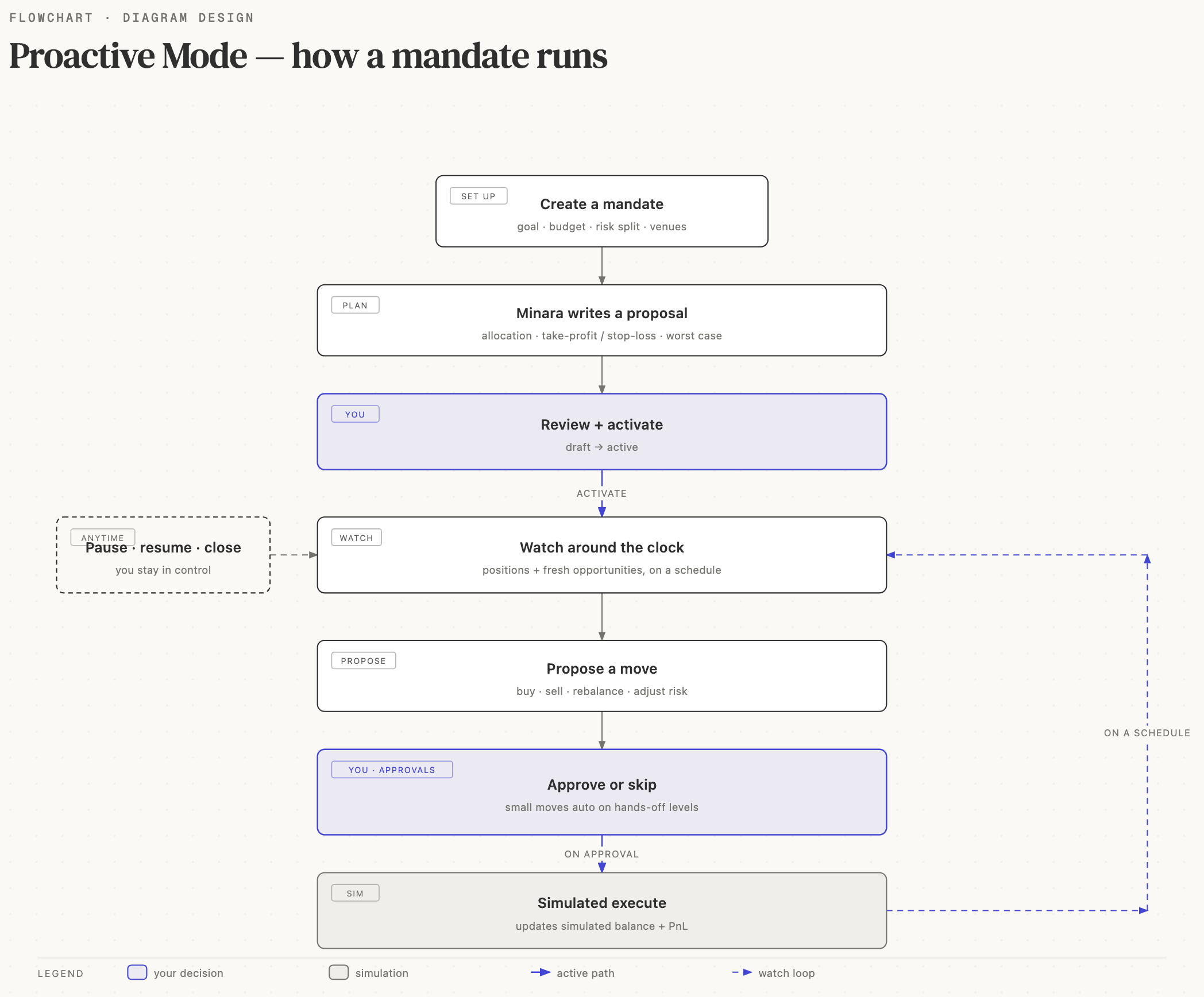
- You review and activate. A new mandate starts as a draft. Look over the proposal, then activate it to begin.
- It watches for you. Once active, it checks your positions and hunts for fresh opportunities on a schedule, around the clock.
- It proposes moves. When something needs doing — buy, sell, rebalance, or adjust your risk mix — it lines the move up for you.
- You approve. Anything waiting shows up in your Approvals inbox. Approve or skip it. On the hands-off levels, small moves run on their own.
- You stay in control. Pause it to stop watching for a while, resume when you're ready, or close it for good. None of these sell your positions on their own.
Because everything runs in simulation, "buying" and "selling" update a simulated balance and profit-and-loss, so you can watch how the mandate would have done.
Where to find it
Open Proactive Mode from the dashboard or the sidebar. You land on your Mandates list. From there you can:
- Open the About tab for a quick tour.
- Open any mandate to see where its money is, what it has done, and its latest proposal.
- Check the Approvals inbox for anything waiting on you.
Related
- Strategy Studio — build your own strategies, which Proactive Mode can pick from.
- Autopilot — run a single AI strategy on a sub-wallet.
- Portfolio — see all your positions in one place.