 MINARA
The Skill System
How routing and activation work, plus the full catalog of available skills
Skills are Minara Agent's unit of capability. A skill bundles a prompt fragment, a tool whitelist, and a pile of metadata that tells the router when it's relevant. A skill is a discovery and playbook entry point: activating it surfaces the domain's tools and pulls in the guidance for using them (when to reach for which tool, the methodology behind a workflow, the field theory it rests on). It is not a tool authorization gate. In a normal session every registered tool is callable directly; loading a skill just helps the model find the right ones and read the playbook. Think of skills as plugins the agent loads on demand.
Why not MCP? Minara uses its own in-house skill + tool registry (not MCP) for core capabilities because finance tools need per-call permission tiers, typed schemas, and fund-moving confirmation gates that MCP's spec doesn't cover. External providers are still integrated through MCP servers (see Custom MCP).
This page covers the mechanics (routing and activation) and the full catalog of every skill the agent can activate.
See this in use: Features pages each reference the skills they activate. Installing Skills shows the user-facing side of vendoring external skills.
The three layers
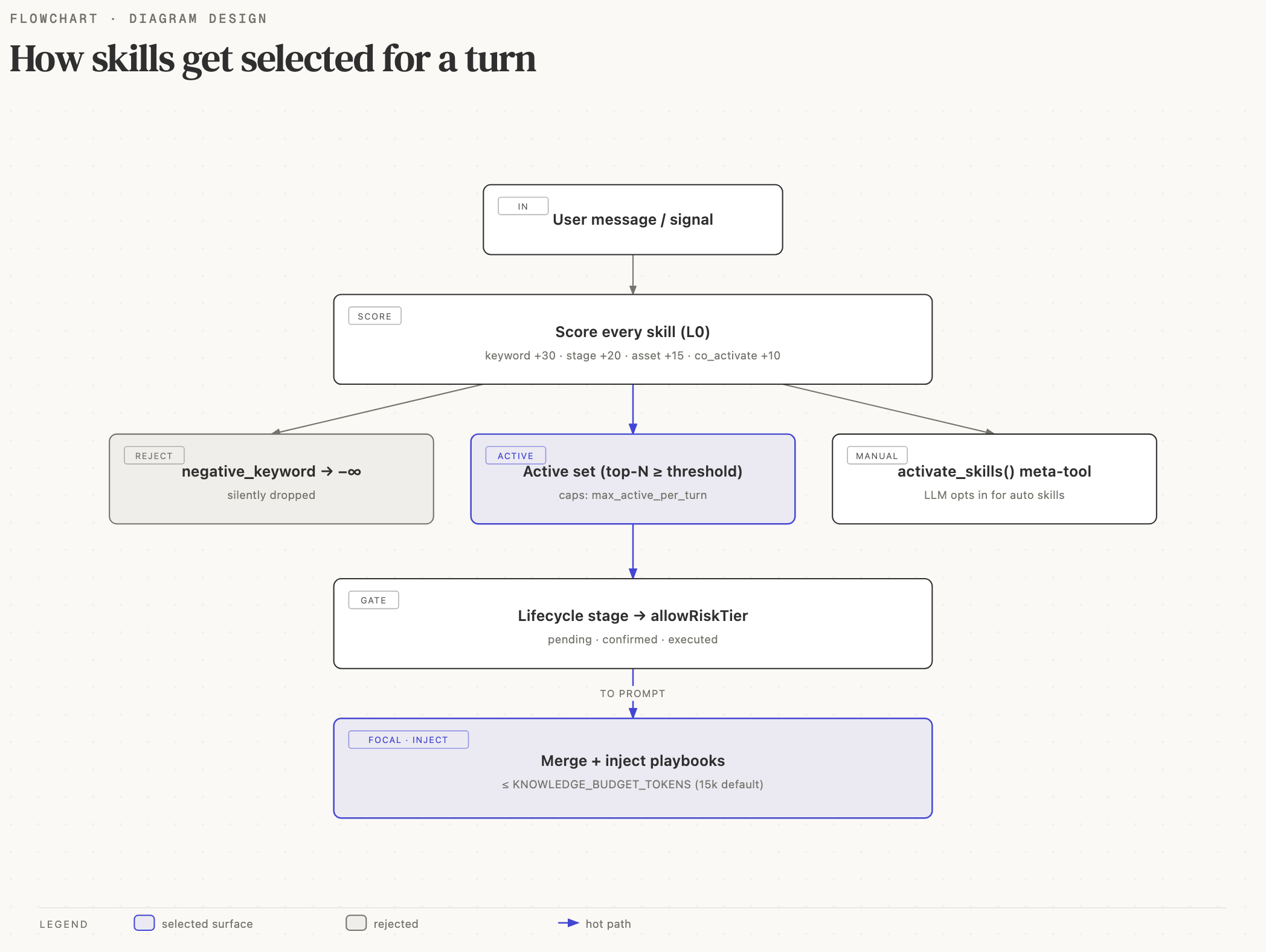
The diagram above shows the routing pipeline: a deterministic L0 router, a non-deterministic LLM activation step, and a deterministic tool-call layer.
The L0 router is deterministic: same input produces the same catalog.
The LLM's activate_skills call is the one non-deterministic step.
The tool-call layer (per-call permission tiers and fund-moving
confirmation) is deterministic again, and it runs when a tool is
invoked, not when a skill is activated. So the two ends of the
pipeline are testable without an LLM, which is a deliberate design
choice.
L0 routing: the deterministic pre-filter
buildRoutedCatalog() in
apps/agent/src/skills/router.ts takes a
TurnRoutingContext and scores every registered skill:
| Signal | Score |
|---|---|
| keyword hit in user message | +30 each, capped +60 |
| lifecycle stage match | +20 |
| asset class match | +15 |
co_activate from another hit | +10 |
| signal source match (cron turns) | +25 |
| fallback (priority tiebreaker) | 100 - priority |
| negative keyword hit | −∞ |
failed conditions | −∞ |
Any skill scoring -∞ is dropped from the catalog entirely and is
never seen by the LLM. Conditions are the graceful-degradation knob:
conditions: {
  requires_env:      ["GLASSNODE_API_KEY"],   // skill hidden without key
  requires_tools:    ["glassnode_metric"],    // skill hidden without tool
  requires_toolsets: ["documents"],
  fallback_for_tools:["web_extract"],         // only surface when web_extract absent
  platforms:         ["darwin", "linux"],     // hide on Windows
}
The output RoutedCatalogEntry[] carries the reasons a skill scored
(e.g. ["kw:buy", "stage:decide"]), which the registry's
buildCatalogFor() renders into the catalog block as inline hints
for the LLM.
Activation: the main LLM decides
The base system prompt always exposes one meta-tool:
activate_skills(ids: string[], confirmed?: boolean)The LLM reads the routed catalog, picks the skills a request matches,
and calls activate_skills(["minara.core", "memory-personal"]). The
tool handler calls SkillSession.activate(), which loads those skills'
playbooks and tool hints into the prompt. Activation never asks the
user and runs no risk gate; all safety enforcement lives at the
tool-call layer (see below).
Mechanically, the loaded set is whatever the most recent
activate_skills call passed, so a fresh call replaces the prior set.
This keeps prompt size bounded. It is not a tool gate: a baseline
surface (activate_skills, resolve_asset, search_listed_tokens, search_dex_tokens,
memory_*, todo, and a few more,
the DEFAULT_ALWAYS_INCLUDE_TOOLS set in
apps/agent/src/skills/session.ts) is callable on every turn with no
skill active, and on the main session any other registered tool is
reachable directly through tool_invoke. Activation is about
discovery and playbook prose, not authorization.
No skill is always-active. Identity, safety invariants, language
policy, and the markdown wire-protocol
live in the cached system-prompt skeleton
(apps/agent/src/core/system-prompt-skeleton.ts) and are baked into
every turn's prefix.
Body-budget + shed
Once active, a skill's prompt body is concatenated into the system
prompt only when the cumulative size of all active bodies fits the
per-turn budget (SKILL_BODY_BUDGET_CHARS = 12000, ~3000 tokens).
Lowest-priority bodies are SHED first when the budget is tight; their
tools stay callable but their guidance prose is dropped. The catalog
tags shed skills (active, body shed) and inlines their summary
(when present) so the LLM still has mid-detail guidance.
Where the safety gate actually lives
Skill activation never confirms anything. The fund-moving and
high-risk gate sits at the tool-call layer, in
apps/agent/src/tools/_security/tier-gate.ts,
keyed off each tool's permissionTier:
| Tier | Behavior |
|---|---|
READ_ONLY | runs immediately |
CONFIRM_ONCE | confirmation on first use, then remembered for the session |
ALWAYS_CONFIRM | confirmation every call; autonomous calls need a stored grant |
MANUAL_ONLY | requires explicit approval; autonomous calls are rejected |
Because the gate is keyed on the tool, not the skill, it holds no
matter how a tool was discovered. A compromised tool output that
echoes an activate_skills call cannot move funds: activation only
loads playbook prose, and the actual trade tool still hits the tier
gate with full argument context. The agent-loop page covers the hook
chain in detail (see The Agent Loop).
Lifecycle stages
The router infers lifecycle stages from the user message:
| Stage | Triggers on |
|---|---|
discover | "what's trending", "show me", "price of" |
evaluate | "should I", "analyze", "compare", "risk" |
decide | "buy", "sell", "long", "short", "swap" |
manage | "close", "stop loss", "my positions" |
Stages feed routing (a stage match adds to a skill's catalog score)
and give the tool-call layer context (an autonomous source on a
discover turn tightens what the tier gate will run). Stages no
longer clamp which skills can activate; the trade boundary is held by
the tool tier, so sneaking a trade call into an innocuous question
still hits the confirmation gate at execution time.
Signals: cron and webhook turns
A cron fire or webhook delivery constructs a SignalContext:
{
  source: "cron",
  signal_id: "btc_drop_5pct",
  asset: { symbol: "BTC", asset_class: "crypto_major" },
  severity: "warn",
  preload_skills: ["market.watch", "memory.alerts"],
  suggested_stages: ["evaluate"],
  trace_id: "t_abc123",
}
preload_skills is a hint to the router to activate those ids
without waiting for the LLM to call activate_skills. A preload only
loads playbook prose, it does not bypass the tool-call tier gate, so
an autonomous cron or webhook turn is still constrained at execution
time: a MANUAL_ONLY tool called from a cron source is rejected
outright. Session runtime placement (Preferences computer.backend) pins
shell / files / execute_code for the chat; there is no per-call
environment override for the model.
trace_id
threads through WorkflowInstance, SkillAuditRecord, and tool
execution logs, so "what did the 14:03 BTC alert do" is a single SQL
query.
Writing a good skill
Concrete guidance, accumulated from the built-ins:
- Keep the prompt fragment under 800 tokens (~3 KB). Long prompts blow out the cacheable catalog block and slow every turn.
- Be specific in
description(≤ 80 chars). The LLM chooses skills by description; the prompt is only seen after activation. "Perps: open, close, monitor positions on Hyperliquid" is good. "Trading stuff" is not. - No skill is always-active. If content should run on every turn
(identity, safety, markdown protocol), it belongs in
core/system-prompt-skeleton.ts, not in a skill. - Lean on
routing.keywordsfor visibility. A skill with strong bilingual keyword coverage scores high in the routed catalog so the LLM finds it on the first turn. - Set each tool's
permissionTieraccurately, not the skill. Risk lives on the tool, not the skill. Don't tag a fund-moving tool as a low tier to skip a confirmation; review will catch it. - Declare
conditions.requires_envfor every external provider. The registry will silently hide your skill on dev machines without the key, which is the correct behavior. - Keep
tool_namesminimal. Only list tools the skill actively uses. A skill with 20 tools is usually two skills pretending to be one.
Reference implementations (SKILL.md packages):
- Tool-heavy skill:
minara-perps/ - Prompt-heavy skill:
deep-research/ - Methodology-lens skill:
analysis/
External skills
apps/agent/src/skills/external/ holds vendored third-party SKILL.md packages.
They're added with minara skills add <git-url> which:
- Clones the repo into
apps/agent/src/skills/external/<id>/. - Detects the license and records it in
.minara-skill.json. - Refuses to add content under a proprietary license (past incident: Anthropic's office skills).
- Builds a
DomainSkillfrom the SKILL.md frontmatter at boot viabuildExternalDomainSkills().
External skills are first-class citizens. They go through the same registry and router as the built-ins, and their tools hit the same tool-call tier gate. There is no separate code path.
Skills catalog
The full catalog of every builtin and external skill lives in the reference section. It is auto-generated from each skill's SKILL.md, so it never drifts from the code:
- Builtin skills: compiled into the binary
- External skills: vendored SKILL.md packages
Prefer a builtin when a capability exists in both forms. It ships with the binary, is typechecked in CI, and calls the in-house tool registry directly. Reach for an external skill when the builtin doesn't cover the provider you need, or you want upstream SKILL.md updates without waiting on a release.
The skill system is where Minara Agent's finance-safety model is most visible. If you're adding a skill that moves money, walk through the full pipeline (L0 scoring, LLM activation intent, and the tool-call tier gate that runs the confirmation flow) before you write any code. It is much cheaper to catch a design mistake here than to patch it after a bad trade.