 MINARA
The Agent Loop
How a single turn flows from user message to final answer, and the bookkeeping that holds it together
The agent loop is the turn orchestrator. It owns one job: take a user
message, run it to a final answer, and persist everything that happened
along the way. Every feature in Minara, a price check, a trade, a deep
research report, runs through this one loop. It lives in
apps/agent/src/agent/runtime.ts
as the AgentRuntime class.
Why the Vercel AI SDK and not a hand-rolled loop? A turn is a short, bounded sequence: build context, call the model, run the tools it asks for, feed results back, repeat until it stops. The AI SDK's
streamTextalready models exactly that multi-step tool loop, with one provider-agnostic interface across Anthropic, OpenAI, xAI, and OpenRouter. Minara keeps the interesting policy (which tools are allowed, which gates fire, what gets cached, how context is compacted) in the modulesstreamTextcalls, and lets the SDK own the mechanical call-tool-observe iteration.
See this in use: every chat turn in the REPL and the HTTP gateway drives this loop. The Your First Trade walkthrough is one turn through it end to end.
The turn pipeline
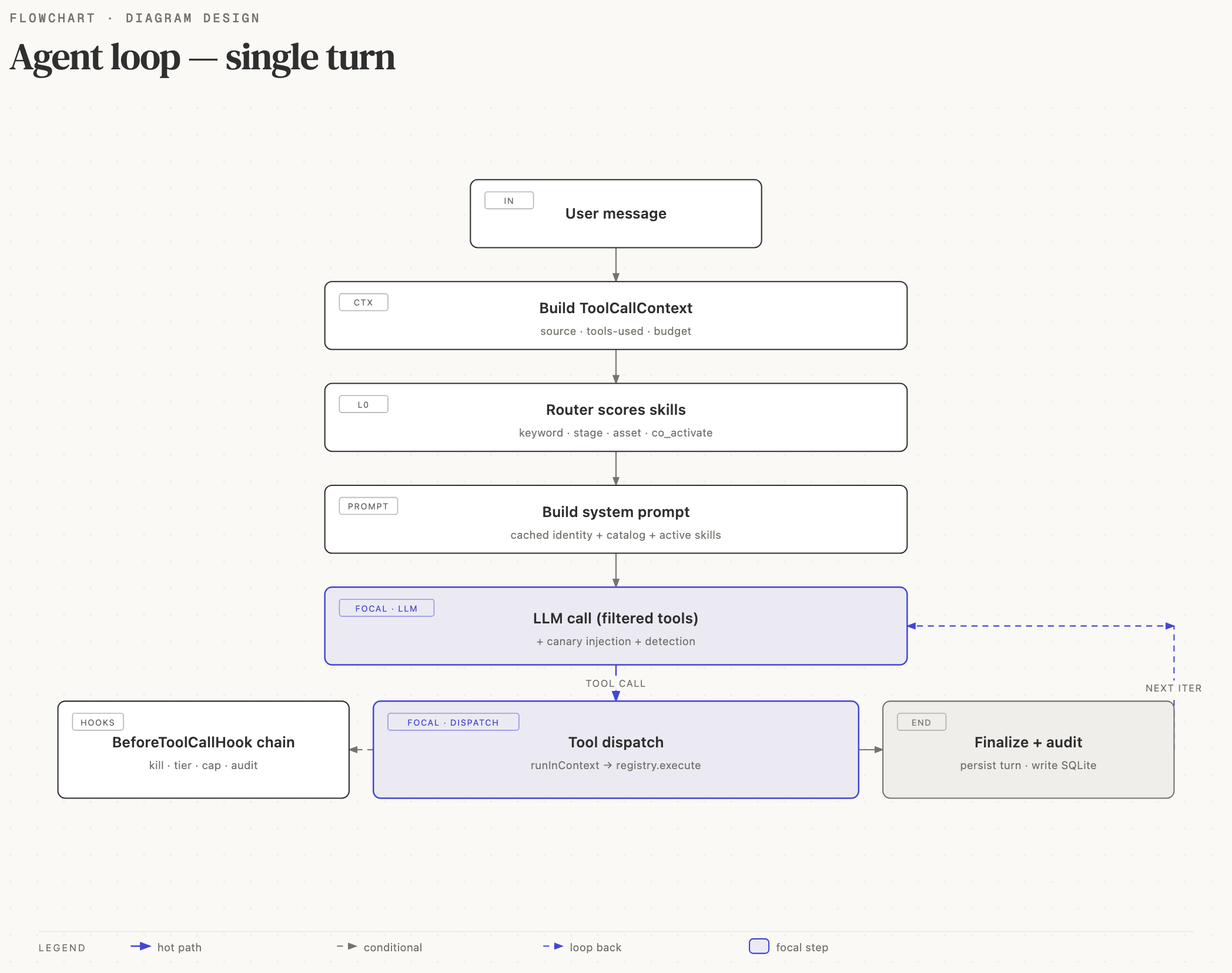
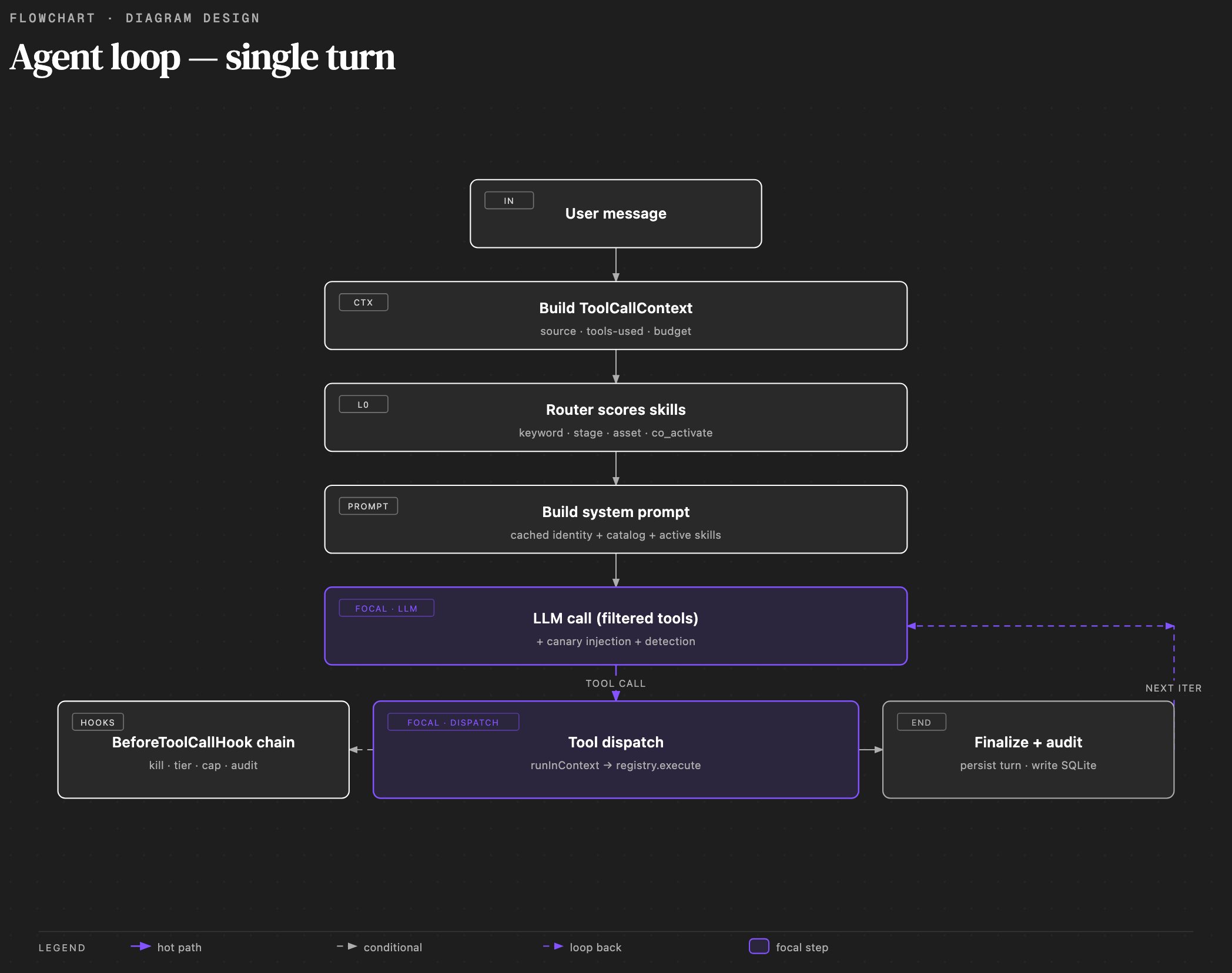
AgentRuntime.run() is a turn-shaped pipeline. It runs these phases in
order and emits a single AsyncGenerator<AgentEvent> that both surfaces
(gateway SSE and the REPL) consume, so there is one event stream rather
than a scatter of callbacks.
1. Pre-turn
Before the model is called, the runtime runs preference graduation and
the input scanner, then assembles the system prompt with
buildSystemPromptBlocks().
The prompt is built from declared blocks, not string concatenation, so
the cacheable prefix (identity plus skill catalog) stays byte-identical
across turns and rides Anthropic's prompt cache. The dynamic tail
(active skills, signal context, pending confirmations) is rebuilt each
turn. Block order is load-bearing: a change that mutates the cached
prefix turns one warm call into a cache miss. Workspace instruction and
memory files (SOUL.md, USER.md, MEMORY.md, and recent daily journals)
are placed ahead of derived layers, so the operator's curated ground truth
wins over inferred context. HEARTBEAT.md remains a persisted runtime and
operator record; it is not sent to the model (see
Workspace).
Which skills are active is decided first by the router: it scores every skill on keyword, lifecycle stage, asset class, and co-activation, and the active set decides which tool sets the model is even allowed to see.
2. Compaction ladder
Before calling the model, the runtime applies persisted boundaries and
replacement bytes, evicts historical media, and runs threshold or idle
compaction with top-N reinjection when needed. Tool text is preserved as it
ages; age alone does not trigger a rewrite of the cached history. The full
contract lives in
docs-src/context-management.md.
3. streamText
The runtime calls streamText with the tools the active skills allow,
intersected with the turn's allowed tool sets. The SDK drives the
call-tool-observe loop internally and stops on
stopWhen: stepCountIs(maxSteps). Each step:
prepareSteptrims the cumulative token budget before the call.- The model emits text and tool calls; tool calls dispatch through the registry (next section).
onStepFinishrecords usage and emits a step event into the stream.
The whole streamText invocation is wrapped by an overflow-recovery
guard that trims and retries if a step blows the context window.
4. Tool dispatch and gating
Each tool call the model emits dispatches through the tool registry. Two things gate it:
- Permission tier. Every tool carries a
PermissionTier(READ_ONLY→CONFIRM_ONCE→ALWAYS_CONFIRM→MANUAL_ONLY). The tier is enforced, not advisory. - The safety stack. Fund-moving handlers gate on a shared preview-confirm helper, and trade paths additionally pass the hook pipeline (token-safety, exposure, slippage, risk-manager caps, audit log). A blocked call returns a structured error the model sees as a normal tool result; the audit log records it distinctly. The full 6-stage stack is documented in Safety & Sandboxing.
Turn state (the source, the running used-tools set, the risk ceiling)
travels on a ToolCallContext so every tool call, including sub-agent
calls and skill-executed sequences, reads the same per-turn state.
5. End-of-turn
When streamText stops, the runtime emits a post_turn event that
fans out to decision capture, chat-turn recording, workspace state
updates, dashboard cache invalidation, and observability. This is the
record the observability tooling
reads and the source the
learning system reflects
over.
Turn bookkeeping
Two invariants make the loop safe to extend:
- One context per turn. Risk ceiling, signal context, and the
used-tools set live on the
ToolCallContext, never on module-level state. Concurrent turns (the REPL and the gateway can run at once) never see each other's bookkeeping. - The cached prefix is immutable. Mid-turn skill activation appends a note rather than rebuilding the system prompt, because rebuilding the prefix would break the prompt cache. Any change to loading or compaction has to avoid touching the cached prefix.
Deterministic execution outside a turn
Not every tool call goes through streamText. Scheduled and
event-driven workflows
invoke registered tool handlers directly through the registry, with no
model round trip. A tool_call workflow step runs the exact handler the
loop would run, under the same permission tiers and safety gates, but
without spending a model call to decide it.
Two consequences:
- Routine automation (alerts, briefs, monitoring) stays cheap. The engine spends tokens only on steps that explicitly carry a model node.
- Execution semantics match the tool implementation, not a model's reading of its schema.
The loop and the workflow engine are two front doors onto one tool registry, which is why a fund-moving step still goes through the two-step confirm wherever it runs.
See also
- The Skill System — routing, activation, and the tool whitelist the loop calls with.
- LLM Integration — the provider
abstraction and model routing behind
streamText. - Safety & Sandboxing — the permission tiers and finance safety stack the dispatch step enforces.
- Workspace — the files that supply identity, memory context, and persisted runtime state.