 MINARA
Connectors
Connect Minara to work apps, cloud files, calendars, and brokerage accounts.
Connectors let Minara work with services you already use. A Connector groups the service permissions, accounts, and Skills that belong to one provider. You stay in control of which Connector appears in Chat and which ones Minara can use for the current task.
Start here
- Open Connectors below the Chat input.
- Choose Add connectors to open the Catalog.
- Select + next to a provider.
- Choose Off, Read, or Full for each service.
- Complete the provider sign-in.
- Open the Connector menu and turn it on for the current task.
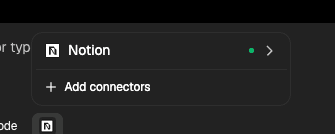
The first-level menu initially includes Google Workspace, Gmail, OneDrive, Outlook Mail, and Notion. More built-in providers are available in the Connector Catalog. A Catalog entry joins the first-level menu only after a successful connection. Disconnecting does not remove it. Remove a disconnected entry manually from the Catalog.
Three separate controls
| Control | What it changes |
|---|---|
| Connect | Grants a provider account and selected service permissions. |
| Add to menu | Keeps the Connector visible in the Chat picker. |
| Use in this task | Adds the Connector's Skills and tools to the current task only. |
These controls are independent. A visible Connector may still need sign-in. A connected Connector does not enter every task automatically.
Accounts and permissions
A Connector can hold multiple accounts. Choose the intended account before a read across identities. Every write must resolve to one account. Permission selection happens before sign-in, and Minara derives the provider scopes from that selection.
Read covers retrieval and search. Full adds supported write actions. Full access does not bypass confirmation. Sending mail, publishing over an existing cloud file, and placing an order retain their own safety checks.
Local and cloud delivery
Artifact-producing Connectors support three delivery preferences:
- Connector first creates and verifies a canonical local file, then publishes a copy through the Connector.
- Local first keeps the result local and offers publishing afterward.
- Ask requests a destination before generation.
If cloud publishing fails, the verified local artifact remains available.